Stop clicking the same button over and over.
Auto Click is a lightweight Chrome extension that repeatedly clicks a selected on-page button at a fixed interval — in plain sight and under your control.
- ✓
You choose the button (no guessing, no scripts)
- ✓
You choose the interval (seconds/minutes — your call)
- ✓
Start / pause / stop anytime with one click
- ✓
No background bots — runs only while the tab is open

What Auto Click helps you do
If a workflow forces you to repeatedly click the same on-page button, Auto Click handles the repetitive part while you remain in control.
Timed clicking made simple
Set your interval once and let Auto Click click the selected button for you.
Visible, not hidden
All clicks are visible in your active tab. No “background” behavior.
Works on most standard pages
Any page with a clickable element can be a candidate — choose the button and go.
Stop anytime
Start, pause, stop, or restart with one click — you control the session.
Compatibility
Auto Click is a Google Chrome extension. It works on Chrome browsers only. It runs while your tab is open and clicks a button you select.
Demonstrated compatibility
HerculistPlus – TheZone is shown in the demo video as a real-world example.
General compatibility
Also usable on other platforms and pages that require repetitive on-page button clicking.
Important: Always use responsibly and follow any website’s terms. Auto Click is not a bypass/exploit tool.
📘 Included Supporting Documentation
Included • Part of the ProductAuto Click includes essential documentation to help you install correctly, understand the controls, and avoid common setup issues.
Quick Start Video Guide
A short walkthrough showing how to install Auto Click, select a button, set intervals, and start/stop the tool.
Efficiency & Troubleshooting Notes
Simple notes covering common setup mistakes and basic fixes to help the tool run smoothly.
Responsible Use Notes
A concise outline of intended use, limitations, and important usage reminders.
How it works
Setup is straightforward — install, select, start.
Session note
Tested for ~2–3 hours of continuous use. For longer sessions, restart the extension for best performance.
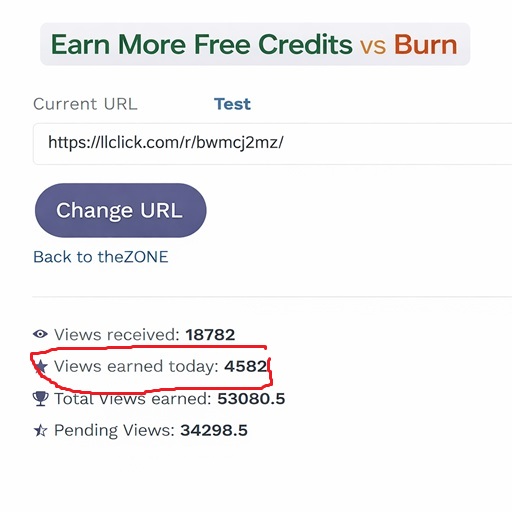
⚠️ One-Time Traffic Exposure System
Learn how to display your ads to up to 2,000–4,000 real platform users per day without paid ad spend.
Offered only at checkout and not shown again.


He Didn't Just Buy Auto Click... He Asked To Promote It.
Most customers buy a product, use it, and move on. But one customer purchased Auto Click, used it for several days, and then contacted us asking for an affiliate link because he wanted to recommend it to others.
We didn't ask for a testimonial. We didn't offer a reward. He simply found the extension useful enough that he wanted to share it.

Customer contact details have been removed for privacy.
Get instant access
One-time purchase. Download and start using Auto Click in minutes.
- ✓
Chrome extension file
- ✓
Setup instructions
- ✓
Short demo video walkthrough
- ✓
Basic usage support
Works on Google Chrome only. Runs while the tab is open. Visible, user-controlled clicking.
Before you buy
Auto Click is a manual click assistant — not a background bot, scraper, bypass, or exploit tool. Please watch the demo video to confirm the behavior matches your needs.
Refund policy
Due to instant digital delivery, all sales are final. Please review the demo video and product details before purchasing.
Support
Basic setup and usage help is included. If you have a compatibility question, contact support before purchase.
FAQs
Quick answers to the most common questions.
What browser does Auto Click work on?
Auto Click is a Google Chrome extension, so it works on Chrome browsers only. Other browsers are not supported at this time.
Is Auto Click a bot or background automation tool?
No. Auto Click is a manual click assistant. It clicks only while your tab is open, and all clicks are visible and user-controlled.
What sites does it work on?
It works on most standard web pages with clickable buttons. It’s demonstrated with HerculistPlus – TheZone in the demo video, and can be used for other repetitive clicking workflows too.
How long can it run continuously?
It’s designed for short continuous sessions and tested for ~2–3 hours. For longer sessions, restart the extension for best performance.
Do you offer refunds?
Due to instant digital delivery, all sales are final. Please watch the demo video and review the details before purchasing.
Responsible use
Auto Click is intended to assist with repetitive on-page clicking in a visible, user-controlled manner. You are responsible for using it in accordance with any website’s terms, policies, and applicable laws. This tool does not provide account bypassing, scraping, exploitation, or background automation.
WAIT!
Don't miss out on this one-time offer!